Monday, 31 January 2022

Analogue Backgrounds

This piece was technically the second piece I made in Callipeg, as I did the outlines not long after I created my first piece back in December. After creating a quite experimental/ loose animation as a self introduction to using the app, I wanted to trial it in a more practical sense, i.e. creating clean roto outlines which are quite common in my work, resulting in this:

The outlines (frame 1)

I was pleased how nicely the outlines came out, but I wasn’t particularly sure how to finish/ colour the piece. I hadn’t long since done a quite clean EbSynth piece and I didn’t want to do hand shading like I did in my first Callipeg shot either, because I was really trying to vary what I was creating.

So I just left these lingering around for a while, hoping I’d think of an interesting way to finish it. Usually if I’m stuck on a piece, I tend to leave it (unless I have an impending deadline), start something new and come back to it with fresh eyes and fresh ideas. If I don’t have a time pressure, I find working like this is usually a good system for getting things done, for me at least.

Two pieces later, I thought it was time I came back to this one- it was hanging over me and I wanted to get it finished! I really liked how the outlines looked and I wanted them out in the world (and out of my head)!

After watching the clip through, I thought, well why don’t I just do something quite experimental with this one? After all, I’ve had the outlines for ages so I might as well just go for it, whatever ‘it’ was. I then decided to print out the first 4 frames, to experiment/ doodle all over to see what comes up. Getting out the pens and paper is always a good inspiration starter for me! I love how you can go from virtually zero ideas to several in the space of around 20 minutes after a little bit of scribbling/ mind mapping.

I started jotting some ideas down, though they were still quite ‘safe’ and not really going anywhere. That was until, over lunch I was scrolling YouTube and decided to watch a suggested video on the MoMA channel on the artist Sophie Taeuber-Arp. I hadn’t previously heard of her, but the thumbnail looked like it might be art I’d enjoy, so decided to give it a watch. Here it is below:


And I really liked what I saw. So decided to use that as my starting point: abstraction. Start with one shape or colour and see how far I can take it, changing a small section each time. That was my starting point, though I ended up straying from that thought, once the ideas came flooding.


As you can see from the above (the first 4 frames), I was initially going to colour the character as well in an analogue way. This changed as I went, because I thought while I focus on the backgrounds, I’ll leave the character and do him afterwards. Though as I was going along, I decided that I’ll actually do the character using fairly flat colours in TVPaint, so it would act as a nice contrast with the hand rendered backgrounds. Looking at the end result, I feel this was a good decision.

I decided to use pens (biros, felt tips, Sharpies, Pro Markers) as the medium, because a) I have a huge box in my room left over from my animation workshop I did in September and b) the medium is a quite quick one to work in, so I can get my ideas down without having to wait for anything to dry etc like I would have if I were using paints. The colours are also really vibrant using felt tips which was good for the bold, block colour shapes I wanted to create.

Once I was happy with them (66 frames in total), I scanned them in and placed each behind the corresponding outline for all the frames in DaVinci Resolve (I’ve moved from Adobe [all but PS] because of the absurd subscription prices). I then exported a PNG sequence of the backgrounds and brought them back into TVPaint where I finished colouring the character.

Like I said earlier, I didn’t want to do a full EbSynth piece, but the flat colours were looking too plain. So I did a hybrid: I made a pastel-looking style frame in Procreate for the hair, which I ran through EbSynth and for the rest of him, I combined the original footage (after applying several effects to in in TVPaint) with flat colours. This had some elements of the ‘real’ look, yet I boosted the flat colours enough, so it didn’t look too strange/ creepy/ uncanny valley. The real footage showing through is very subtle, though more noticeable on the face, which is a nice touch.

Left: the altered live action footage Middle: the plain colours with Procreate styleframe Right: the final character composition

Overall, I do like what I’ve created here and I especially love the backgrounds and the contrast between the clean, computerised look of the character. I think to improve it though, I would have preferred to have taken the live action footage frames into Photoshop and manipulated them a little further, like I did with some previous experiments here and here. It’s just that TVPaint doesn’t have as much choice of filters as Photoshop does, so I didn’t quite get the effect I fully wanted. But my Photoshop is super slow and crashy (either the fault of Adobe or my old computer, but probably a mixture of the two) and I honestly couldn’t be bothered to spend the day waiting for a piece of software to decide whether it wants to work. So I left it as it was!

Here’s the clip:

Wednesday, 19 January 2022

Tennis

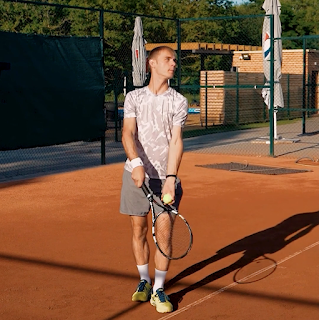
Tennis seems to be in the news a lot lately, but that was legit not the reason I decided to choose to animate this next clip! I actually selected it because I like animating sports/ footage with a nice amount of action in, plus I loved the movement of him serving and the shadows it created (both on the floor and across his body).

Grab from the clip

I wanted to find a style that would not only do the aforementioned movement and shadows justice, but also set it aside from my other work in terms of style. I also wanted it to contrast with my previous two Callipeg clips and try something different (if you have only just become a regular reader of this blog, you’ll soon start to realise that I try to make each piece differ from the previous- I’m a geek like that, I just love learning/ developing)!

I was really tempted to go for clean lines again, but then I was like well my last clip was clean lines so why would I entertain doing the same? Or the same right away, anyway? I appreciate going back to a style you love (it’s the done thing in art, right?) and I do this myself often, too, but I’ve got a short film coming up which I’m animating all in one style, so I decided that this period leading up to that will be a time where I can free myself up a little and experiment. You know, get all this stuff out of my system now, before I can’t change my style for several months whilst animating my short!

So, looking through my work, I was thinking what haven’t I done much of? And what would I like to try or develop more? I really liked my first Callipeg animation in how loose/ scribbly it was, so decided to take that one step further.

I decided to use similar sketchy outlines, though this time used the brush rather than pencil tool, so there was a hard edge to my lines rather than a textured one. I then filled in both the shadows (the cast shadow and the one sweeping across his body) in the same scribbly way. Now, here’s where I almost gave in to temptation- I thought, well you know, I’ve experimented quite a lot already, now can I just play it safe and fill the inside of the figure cleanly?

Scribbly outlines

Here, I almost cracked. I then decided that no, I’ve set out to make something different, so I’m going to make something different. I got mega stubborn on myself and decided to colour him in by the same scribbly manner. Kind of creating a lino print/ wood cut effect (a style I have wanted to emulate for a time now). All along I was worried that it might not look very good, but I guess that if I didn’t like the effect it was creating, I could just fill in the gaps I was leaving out and have a plainly coloured figure or just learn from this mistake and not do a clip in this style again. Not everything I do needs to be ‘great’ or I’ll never learn new things if I don’t try them. Also, not everything I make needs to go on social media/ YouTube (and trust me, it doesn’t)!


I finished colouring his clothing and was liking the result, but still pretty timid as it was my first time doing a full piece like this. I thought that for the skin, I’ll just fill it in plainly (just to add some differentiation I told myself). Then, I pushed through (I’m like wayyyy over dramatising this)! …and decided I was to do the skin in the same way- again, telling myself I could always colour it in fully if I didn’t like it.


Did I need to do any of that? Nope. I absolutely loved the end result and think that if I did colour any of it solidly, then it would have been a weaker piece. I think the moral of this story is to just go for it and experiment where you can, as you might like the result and if not, it doesn’t matter. Or something like that.


Once completed in Callipeg, I exported the file to TVPaint where I was to finish colouring it. I then went a little further. Why not make him a silhouette? Why not use bold and inverted colours? So I did just that and ended up liking the result even more. It also really accentuated the print style which I was going for. Win.


Then, the background- I almost just left it as a plain colour red, but my previous piece didn’t have a background, so I thought maybe I should do one for this. It might even strengthen it. I opened Procreate and messed about for a couple of hours and created a background I really liked and which further enhanced the lino/ woodcut style I was going for. 


A background I discarded


The background I went for


Despite me being tentative throughout the creation of this clip, it was simultaneously an exciting piece to produce. I hope it comes across in the end result- I like to think it does. I love how much I pushed myself with this one and the result is probably more exciting than a lot of the things I make. Doing this has really made me rethink how to approach future works and I hope that the main thing I take from creating this piece is to push myself even if I don’t think it’ll work, because you just never know…

Wednesday, 12 January 2022

Latest Clip/ More Callipeg Love

Part 1: Latest Clip

Being as my last Callipeg animation was something quite loose, I wanted to contrast this by doing something little tighter/ neater.

After exploring several styles (I usually start each piece like this if I don’t have an idea for it already- drag the clip into the timeline, draw around 5-7 styleframes and pick the one I like best/ haven’t used before/ suits the clip most), I decided to go with one which really played on the interesting parts of the clip, which to me, were the shadows and the movement of her jacket. I loved the cast shadow which she created as she walked down the steps and the lovely shadows on her trousers and coat as she walked. I wanted to make a piece which really accentuated this.


I also wanted to do something I’ve not done previously and though I’ve done pieces similar, I can’t recall one which mirrors it exactly. I also didn’t use an outline on this one, to set it even further aside from any other piece. I feel this one definitely looks different than my usual stuff due to the lack of outline.


I used block colours to make each shape really stand out and only went for adding just darks when shading, rather than a highlight colour (which is what I’ve been doing on my recent EbSynth animations). I definitely feel like I achieved what I set out to, even though this clip took a lot of time! The bold shapes really enhanced the shadows and her movements and made, in my opinion, a quite striking image.

Part 2: More Callipeg Love <3

Since my last post about Callipeg, they have released a new update (version 1.8) which has come with some brilliant new features. See those in detail in the video below:


The main one I’ve taken advantage of so far is the export to TVPaint feature (you can also export to Toon Boom, Blender and AE). I utilised it in this project (so I could finish off the colouring which is what I usually do in TVP) and wow, it saved so much time- I didn’t have to export the layer PNGs separately- it did it for you and ordered them in the timeline in TVP with the right timing and everything! Doing all that manually with this project would have taken ages as there were a lot of layers!

The interface has also changed slightly (mostly in a good way), though I did find the ‘add new frame’ button so close to the ‘back frame’ button quite annoying, especially at first. When I rotoscope, I don’t draw the full picture at once- I take one line, say the shoulder for example, draw that for the full length of the clip until I reach the end frame, then pick a new line, draw that pressing the back frame until I reach the start. I repeat this process until all the lines are done. This keeps my lines consistent and feels like a quite quick process. When doing so, I have my left ‘pointing finger’ hovering over the frame froward/ back buttons which I press each time I have completed a line. I’m not usually looking at where my finger is pressing as I’m keeping my eyes on the screen ready to draw the next frame, though I would sometimes miss hit the ‘back frame’ button and add a new frame by mistake, causing the frames I have just made to offset. At first I had no idea what was going on and was like why are all my frames going out of sync?! But then I realised! Since noticing this, I'm being extra careful, but still have full on ‘back frame/ add new frame’ anxiety! Anyway, maybe I’ve just wasted about 200 words to basically say I’m clumsy, or maybe I have a point about the buttons being a bit too close! Who knows…

Also, pro tip for any other rotoscopers out there reading this- if you import a video file into Callipeg which is stored in ‘photos’ on your iPad, the video will downgrade in resolution when imported into Callipeg. If you store the video file under ‘files’ instead and import it from there, the video imports in the correct quality/ res. This is the fault of how Apple stores files, rather than Callipeg, but just incase anyone is struggling like I was at the beginning, then this is how to fix it!

Also, contrary to what I put in my previous post on Callipeg, you can delete what you have selected- all you need to do is bring up the circle menu (two finger hold) and clear the frame like you usually would, though this time it only deletes what you have selected. Thank you to the super friendly and helpful team at Callipeg for helping me with these two issues.

Around a month in with almost constant use (ask my boyfriend if you don’t believe me!), I’m still absolutely loving animating on Callipeg and can’t wait to keep creating work with it…

The Storyboard


After
writing the script, the next step (or at least for me) in my short film process was to create the storyboard. For something which was essentially ‘just drawing pictures’, to be honest, it was a little bit of a challenge.

Maybe this is because I expected it to be easier as I’m more of a visual person than a written one (wait, sorry, but you keep a fairly wordy blog?? Yes, but that’s different)! I think mainly though, it was because it felt quite relentless: there were soooo many shots/ panels/ boards (whatever they’re called in the biz) and to get what was in my head accurately down on the page was pretty tough. It was also hard to know what kind of shot might work best to visually get what’s on the page successfully to the screen without making it feel confusing or disorientating to the viewer.

The current storyboard stands at 175 panels (I think there may be a little redrafting yet to come), which feels quite a lot for a 12 page script (so approximately a 12 minute runtime). As the film isn’t going to contain any camera movements, I perhaps needed to use more shots to get some of the action across, instead of using a single camera move if the camera could be used to track/ pan etc. I’m planning on shooting the whole thing using a tripod, because it will be the simplest way to add the backgrounds in afterwards- I’m shooting in essentially an empty room, bar a few props/ furnishings, so pretty much everything else needs to be drawn in post. The most efficient way of doing this would be to not make any shots over complicated with moving the camera (or at least not until post-prod) or it’ll make my job creating backgrounds a lot, lot harder.

I know I said it was challenging at times, but despite this, I did find it quite fun on the whole. I actually ended up asking my partner Ben to pose for me (thank you) so I had an accurate reference to go off. I then comped the photos I took of him on top of other reference photographs to create a full image, which I would then draw over and fill in anything which I didn’t get on the photos. This worked really well and it felt like a really smooth process. It also helped clear a couple of things up for me in terms of logistics for the impending shoot…

I used Callipeg to draw the images with and put it together in TVPaint- it has a wonderful storyboard feature integrated in the program. Something I have only just learnt about after having been using the software for 6 years! They have several brilliant tutorials on their YouTube channel which explains how to work it.

Wednesday, 5 January 2022

Background Styles

While working on the storyboard for my upcoming animated short film, ‘Bear’, I simultaneously have been working on a background style for it.

I have a quite good idea in mind of what style I’ll be using for the characters (perhaps a post on that to follow- we’ll see), though backgrounds are something I’ve often previously struggled with. I think this is because when I create clips to practise my animation, I usually focus on the thing that moves (so the character) as my intention has always been to explore animation styles, not the background.

I also used to find digitally drawing them really difficult on my Wacom (not a display tablet)- drawing on my tablet has never felt that natural, so any images which weren’t things I was rotoscoping seemed to take forever and be hard to get the strokes right. I also used to find drawing with Photoshop a fairly clunky experience, despite the amount of digital artists who do use this software. This was all until I purchased my iPad and downloaded Procreate, that drawing digitally finally just felt like drawing on paper and really natural. I wish I had known this all along!

With my new tools, I decided to create a couple of ‘test’ backgrounds. As I said I already knew what style I’ll be going for with my characters (a black outline, with the colour/ shading being quite bold/ graphic/ clean), I wanted to make the backgrounds contrast with this, enhancing the characters and making them stand out (after all they are the focus).

I want the backgrounds to clearly be ‘there’, but not distract, so something impressionistic was what I was looking to achieve. Though, not too impressionistic or abstract that we can’t see what is happening! I also didn’t want the background to include any outlines in attempt to remove it further from the character style.

After quite a lot of trial and error with different brushes (I’m very new to Procreate), I decided to use the ‘Spectra’ brush for the majority of it, with a variety of other brushes for the other elements such as the sky (exterior) and the floor/ walls (interior). This brush gave a gentle pastel kind of effect and gave me the right texture I was looking for.

I made the exterior one first, though decided to also make an interior one, to see how the look would translate on both as my film contains a variety of settings. I think the style is consistent across the two (something which I was worried about) and it definitely contrasts with the proposed character style. So I think I achieved what I wanted.

One thing I haven’t quite decided yet is how to do any props/ anything the character interacts with. An idea I have had, would be to give certain elements a black outline, so it’s more in keeping with the character, but have them coloured in the way the background is. This will act as a nice cross over between the two styles and could really work for the props. This will be something I need to experiment with first, as it will also mean doing some animation in Procreate- something I’m yet to try...

Below are the two background images.


Sunday, 2 January 2022

2021 Top Film Recommendations

Like last year, here are my top film recommendations out of the (feature) films I watched during 2021. In total I watched 144 (143 being ‘new’ i.e. one’s I have not previously watched, with 1 rewatch: Richard Linklater’s ‘A Scanner Darkly’ [of course]), down from 219 in 2020 (the pandemic gave me a lot more film watching time)!

These are listed in order of which they were watched, earliest being first. There was no way I would try and order them into my favourites- that would be an impossible task!

The title of the film is in bold, followed by the name of the director(s) and then the date which it was made in brackets.

Please enjoy and let me know any recommendations of what to watch this year in the comments.

1. 
Sylvie’s Love, Ashe, Eugene (2020)
2. 
Josep, Aurel (2020)
3. 
Beginning, Kulumbegashvili, Dea (2020)
4. 
Involuntary, Ostlund, Ruben (2008)
5. 
Mogul Mowgli, Tariq, Bassam (2020)
6. 
System Crasher, Fingscheidt, Nora (2019)
7. 
Shell, Graham, Scott (2012)
8. 
Maborosi, Koreeda, Hirokazu (1995)
9. Your Name., Shinkai, Makoto (2016)
10. XXY, Puenzo, Lucia (2007)
11. 
Dead Pigs, Yan, Cathy (2018)
12. 
Fantastic Planet, Laloux, Rene (1973)
13. 
Dheepan, Audiard, Jaques (2015)
14. 
The Chambermaid, Aviles, Lila (2018)
15. Me Without You, Goldbacher, Sandra (2001)
16. 
A Colony, Dulude-De Celles, Geneviève (2018)
17. 
Sonita, Ghaemmaghami, Rokhsareh (2015)
18. 
Outside In, Shelton, Lynn (2017)
19. Two-Lane Blacktop, Hellman, Monte (1971)
20. 
Damnation, Tarr, Bela (1988)
21. Ray & Liz, Billingham, Richard (2018)
22. 
The Mitchells vs the Machines, Rianda, Michael; Rowe, Jeff (2021)
23. County Lines, Blake, Henry (2019)
24. 
Exhibition, Hogg, Joanna (2013)
25. 
The Watermelon Woman, Dunye, Cheryl (1996)
26. 
Babylon, Rosso, Franco (1980)
27. 
And Then We Danced, Akin, Levan (2019)
28. 
Cocoon, Krippendorff, Leonie (2020)
29. 
Shirkers, Tan, Sandi (2018)
30. 
Straight Outta Compton, Gray, Gary (2015)
31. Shiva Baby, Seligman, Emma (2020)
32. Rosie, Breathnach, Paddy (2018)
33. 
Chris the Swiss, Kofmel, Anja (2018)
34. 
Phantom Boy, Felicioli, Jean-Loup; Gagnol, Alain (2015)
35. 
Mickey and the Bear, Attanasio, Annabelle (2019)
36. 
Sweat, Von Horn, Magnus (2020)
37. 
Nomadland, Zhao, Chloe (2020)
38. 
Summer Of Soul (...Or, When The Revolution Could Not Be Televised), Questlove (2021)
39. First Cow, Reichardt, Kelly (2019)
40. 
I Care A Lot, Blakeson, J. (2020)
41. 
Black Bear, Levine, Lawrence Michael (2020)
42. Cryptozoo, Shaw, Dash (2021)
43. Absolute Denial, Braund, Ryan (2021)
44. Flee, Rasmussen, Jonas Poher (2021)
45. Sound of Metal, Marder, Darius (2019)
46. The Summit of the Gods, Imbert, Patrick (2021)
47. Drowning in Potential, Flame, Dax; Haver, Joel (2021)

Thursday, 30 December 2021

Graffiti

My latest animation. Used a simplified comic book kind of style for this one, as opposed to the more complex style I used here, though I did add an extra shading layer on his skin. Despite it being fairly minimal I do quite like the effect, but I don't think it's a style I'll be using in a long form project. Or at least not for now..! She says.

Outlines drawn in TVPaint, everything else in EbSynth. Probably my last blog of 2021 (though making no promises!) so if that's the case, see you next year! Have fun, stay safe and all that xo

Monday, 20 December 2021

I Love Callipeg

Title of this post to be sung to the tune of The Weakerthans, ‘One Great City!’, replacing the ‘I hate Winnipeg’ line. Basically.

Singing aside (not often how I start these posts, but Xmas cheer and all that), I full on caved in and treated myself to an iPad and Apple Pencil (1st gen). Not the iPad Pro mind (unfortunately they didn’t accept exposure /s), but the standard 10.2” 2021 edition which is currently at £319 (a pretty reasonable price IMO).

OK, so a bit of backstory here: I’ve been wanting to be able to animate remotely for a while as I often feel pretty trapped at my desk at home without a portable computer, so if I want to animate (like I do 99% of the time), then I have to go to my desk and are only able to work there. I can’t even animate in a different warmer room in my house, let alone on holiday/ travelling, on weekends away, coffee shops and other such locations. For a while, I’ve been trying to come up with a solution for a portable set up, to enable me to at least do some of the work whilst out and about and the finishing/ fine tuning and comping whilst home.

But, I wasn’t really able to find a suitable solution or animation app which would match TVPaint. Until, I finally found my solution: enter Callipeg. Fanfare please! Callipeg is a fairly new animation app on the scene (conceived 2020) which was built/ developed especially for iPad (all versions with iPadOS 13 or later) and Apple Pencil (both generations). The team behind it are all animators/ work in the animation industry and this knowledge is evident in the UI and usability of the app. As a professional animator myself, I can hardly fault it (especially knowing it’s still in development).

I’ve never animated on anything else beside a Mac/ MacBook, so I was pretty apprehensive going in. I mean all the videos I watched prior to purchasing my iPad made Callipeg look/ sound excellent, but I kind of thought there was something too good to be true about it (maybe I’m a pessimist)! Though there was something about it which I thought, what if it is as good as it sounded, so the iPad was purchased and the app was subsequently downloaded. As soon as I opened Callipeg, I was in love. It was perfect for what I wanted it for.


Here are some of my favourite features:
  • The choice of brushes/ brush options and the fact that there was a ‘fill brush’ setting.
  • The exporting: selecting ‘export with structure’ on the PNG option meant it created a new folder for each layer, rather than needing to do them separately. Please never remove this feature!!
  • The interface- really easy to navigate and loved the frame forward/ backward buttons on the side panel- meaning I don’t need to keep going to the timeline to move forward a frame.
  • Being able to make colour palettes for each project pretty easily.
  • The ease of importing video layers.

I could go on…

Now being a bit picky, I’ll list some things I would have liked to have included:
  • Firstly, an adjustment layer/ effect layer where you can change the colour of a layer by selecting all the frames. It would be so useful for adjusting colour choices near the end of the animation if something doesn’t quite look right, rather than having to go in and change them frame by frame. This is me being picky though, because I always had in mind to finalise the shots in TVPaint, which does allow me to do that.
  • Another feature I wouldn’t mind seeing added would be an option when using the selection tool to delete what is inside the selection.
  • Finally, the addition of clipping masks would be fantastic! These would be super useful, especially when shading.

Though if you check out their roadmap, you can see what they’re working on to add in the future, which I can see some of these features are. Also, their website has a comprehensive user guide in both written and video format, which was great for learning the app.

I also want to say that wow how good are iPads for drawing?! I have been using a trusty Wacom tablet (one without a screen) for all my animating since 2011. I thought having a tablet with a screen wouldn’t really make any difference, so never entertained using anything else before. But seriously, being able to draw directly onto a screen makes such a difference. It feels a lot more like drawing on paper, a feel I never had while using my Wacom. I honestly feel like this is such as game changer for my work. I can produce everything a lot quicker and create the brush strokes I actually want to create. I half wish I had bought an iPad Pro instead, if I knew I was going to like it this much! Next time, eh…

If anyone is unsure whether to get the app, I’d say just go for it. As far as my knowledge goes, it’s the best animation app available on iPad and I’ve not regretted it since. I'll be using it for my upcoming short film.

Below is the first clip I created on Callipeg. I finished it in TVPaint (changing the colours and adding the gradient background). It took 10 hours in total, for 61 frames, full coloured/ shaded- which I think is fairly quick... 

Friday, 17 December 2021

The Script


As I’ve mentioned a couple of times in this blog already, I’m making an animated short film. It's something I've wanted to do for a long time, so while 'in between jobs', I've decided to just go for it. The film is called ‘Bear’ and is a short drama about a factory worker who has a bear head instead of a human head (the only plot details you’re getting for now) and of course, it’ll all be rotoscoped. I’ll be blogging about the process throughout- just see the tag ‘Animated Short’ on the sidebar for all the posts related to this.

So, after dusting off Celtx (yep, still use it), numerous outlines and script drafts later, I have a final version which I am extremely happy with and can’t wait to get filming/ animating.

I haven’t written a script for a short film for a number of years- I think 2013 was the last time I attempted to do so whilst at university. My films since then have either been music videos, documentaries, experimental ‘art’ films, collaborations with writers or poetry films- ones which didn’t need a script, or at least not in the traditional sense. So going into this, I was, as you’d expect, fairly apprehensive.

Being something I’ve not done previously a lot of, I felt I needed a strong dose of validation as to whether it was actually ‘good’- subjective I know, but it terms of whether it reads well and if the story makes sense. One way of getting my head into the ‘short film way of thinking’ (I’ve literally just made that term up) whilst writing was to watch a short film every day, which I have done (and continue to do so) since around October. I watch a lot of features, but only tended to watch short films when at a film festival. Short films are a world away from features in terms of structure and so on, so I find watching a short even day a really good practise. I watch a mix of live action, animation and experimental, so I see a wide array of storytelling ideas and techniques. Watching these has kind of helped towards me 'self validating' my work and whether it could fit alongside any of the shorts I have watched.  

My idea evolved from a dream I had and came together quite naturally after that. Though I would say it did take a while to mould the story into something more ‘whole’. Due to my previous experience of writing, I thought that I would be more tentative to edit my film after the first draft/ outline, but I was quite the opposite. I didn’t have much attachment to any of it, because I knew that if I wanted to make it the best film I could, then I would need to be ruthless and I was exactly that. Every edit I made was with intent of making the story stronger, rather than holding onto a shot I liked the look or idea of.

I think this shows a really nice progression in myself as a filmmaker/ director/ writer (whatever you call it), because several years ago I would have likely held onto it as much as possible and be hesitant to go past a couple of drafts. For this, I did 9 script drafts and a ton of outlines before the actual scripting stage. I expect there will be more iterations too going forward, especially after the storyboarding of it (which is next).

Another thing I did was ask for help! I asked my experienced writer friend and collaborator Alan Livesey to read through a few of the versions and provide me with notes on where the story can be improved. I listened and incorporated a lot of these into the final draft and I have him to thank for making it a stronger piece. Again, this echoes the previous paragraph in terms of my self development- I would never have done this before, or if I did, I probably wouldn't have listened or incorporated any of the feedback- probably would just have taken it personally instead.

I really enjoyed the scriptwriting process- it was like a fun puzzle to put together/ solve. At times, tricky, yes, but still a task I thoroughly relished. I liked piecing together the missing parts (from my original outline) and looping plot points back to each other and so on. It’s something I want to do a lot more of- including writing a feature film, which has been a goal of mine for as long as I can remember...

See you in the next one, stay safe and all that xo 

Monday, 13 December 2021

Ice Hockey

For this, I wanted to make something completely different than my previous piece and do something aside from working towards what could potentially be a style test for the short film I’m making. I wanted to have a bit of fun with it too, so I found a clip I liked the look of, of someone playing ice hockey.

As an avid sports fan, I like doing clips related to the topic, plus I always think that rotoscope lends itself really well to sports (especially skateboarding)! Fun fact: I have only ever watched one ice hockey game IRL- though I did really enjoy myself and definitely want to do it again. Ice hockey over here in the UK is a fairly niche sport, which is probably the reason I’ve never really caught on to it, unlike say football and cricket which I watch a lot of.

With this piece, I used a continuous outline, rather than the pressure sensitive ones I use most often. I’ve not really ever explored this look before, despite being fairly Julian Opie-esque (one of my favourite artists). I do like the thick outline as it gave a really bold effect, though I think I might like to see it used in a way which is on a person who isn’t playing sport, to see if it could actually translate into any of my films (I know I said earlier that this wasn’t a potential style test, though I guess I was wrong)! So, perhaps more of this style to follow…

Anyway, I’ll leave it at that for this post as I’ve been fairly wordy on here recently, with several more lined up (aren’t you lucky). Until then, stay safe and hydrated and see you in the next one!